Pivotal Insights

Budgeting, forecasting and reporting for small and mid-sized finance teams

Plan it, approve it, report on it, straight from your ERP.

Department budgets, approvals, reports, dashboards and cash forecasts in one place, with actuals synced from your ERP and the adopted budget sent back to it. When the month closes, each manager gets their department's results by email. No spreadsheets to merge. No exports to re-key. Every manager can take part, because users are unlimited.

The budget grid: one department's accounts by month, last year's actuals beside them, lines fed from the workforce and capital plans, and the company's goals above the grid.
Connects to
  • Acumatica
  • Dynamics 365 Business Central
  • Dynamics GP
  • Dynamics NAV
  • Oracle NetSuite
  • QuickBooks Online
  • Sage Intacct
  • Others on request

Plan

Each department builds its own budget, inside rules finance sets.

Managers work in a grid they already understand: their accounts by month, last year beside them, and the closed months of this year from the ERP. Finance sets the guidance and the targets once, and every department sees them while it works.
  • Line detail under any account: quantity times rate, a percent of another account, or a driver like square feet times rent per foot
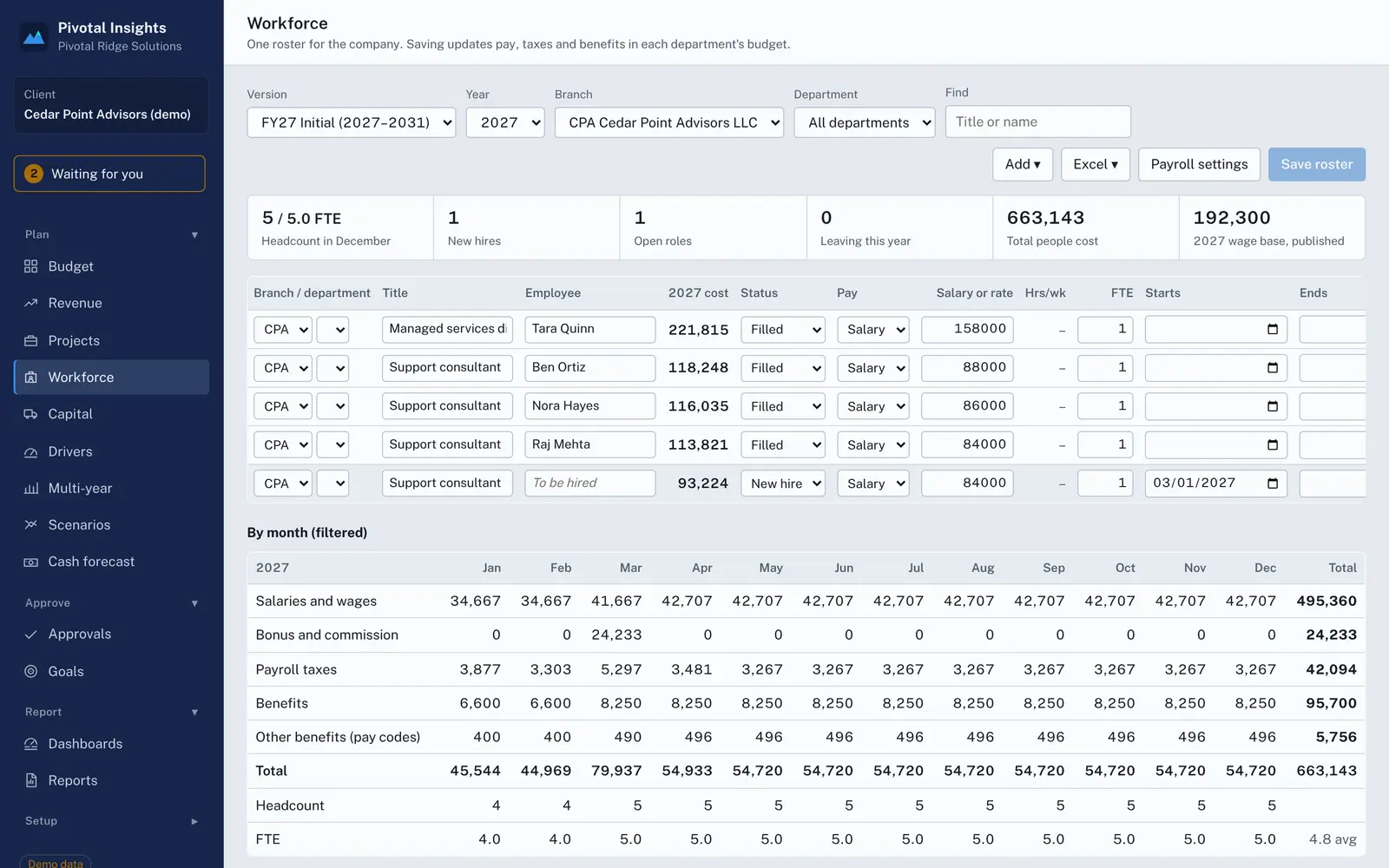
  • Workforce with taxes and benefits, revenue by product or customer, projects, and capital requests with depreciation, all feeding the budget
  • Five-year plans, rolling reforecasts and what-if copies of any plan
  • A first draft from last year or from AI, which the manager reviews and saves
The workforce plan: positions by department with pay, start dates and FTE, and the monthly cost of salaries, payroll taxes and benefits.

Approve

Submissions, approvals and send-backs in the same place as the numbers.

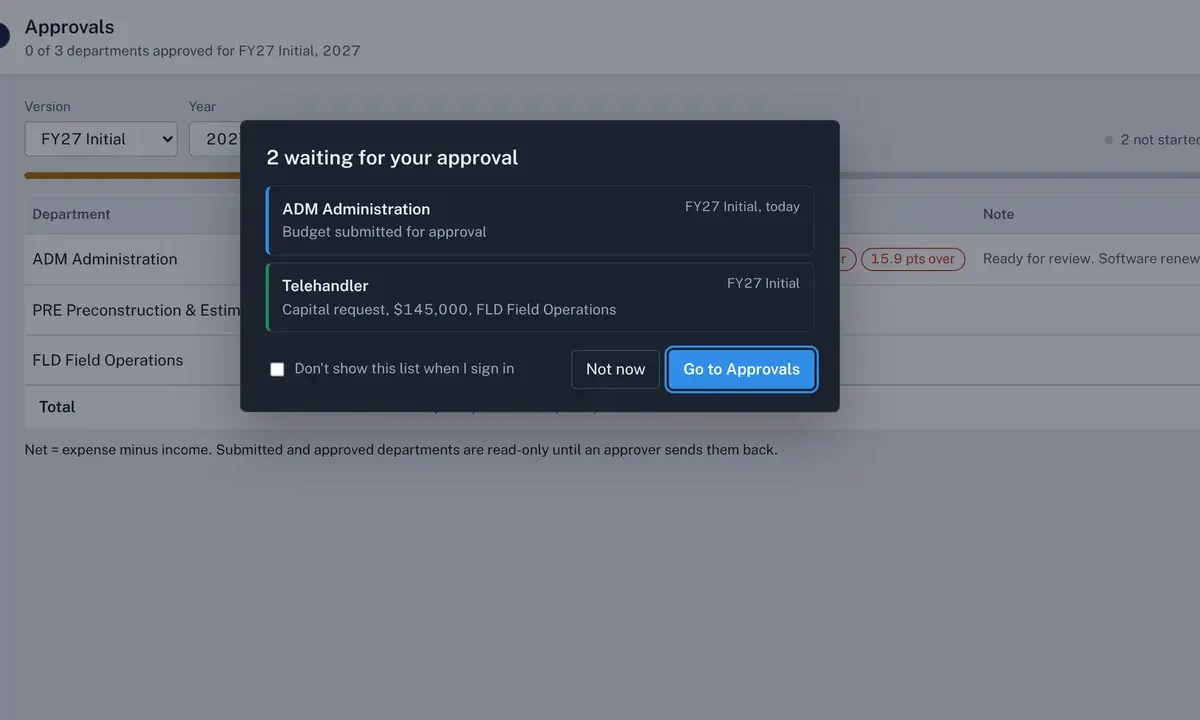
A manager submits. The approver sees what changed against last year, which lines have no explanation, and the notes left on cells. Approve it, or send it back with a note. Approvers see what is waiting for them as soon as they sign in, and by email if they choose.
  • Submitted and approved departments lock until someone reopens them
  • Notes on any cell, with a short AI summary of the changes for the approver
  • Capital requests follow the same path
The approvals page with the list of items waiting for this approver: a department budget and a capital request.

Report

When the month closes, the reports are already done.

Actuals sync from the ERP on a schedule you choose. Dashboards and budget-versus-actual reports update on their own, and each manager can get their department's results by email the day the month closes.
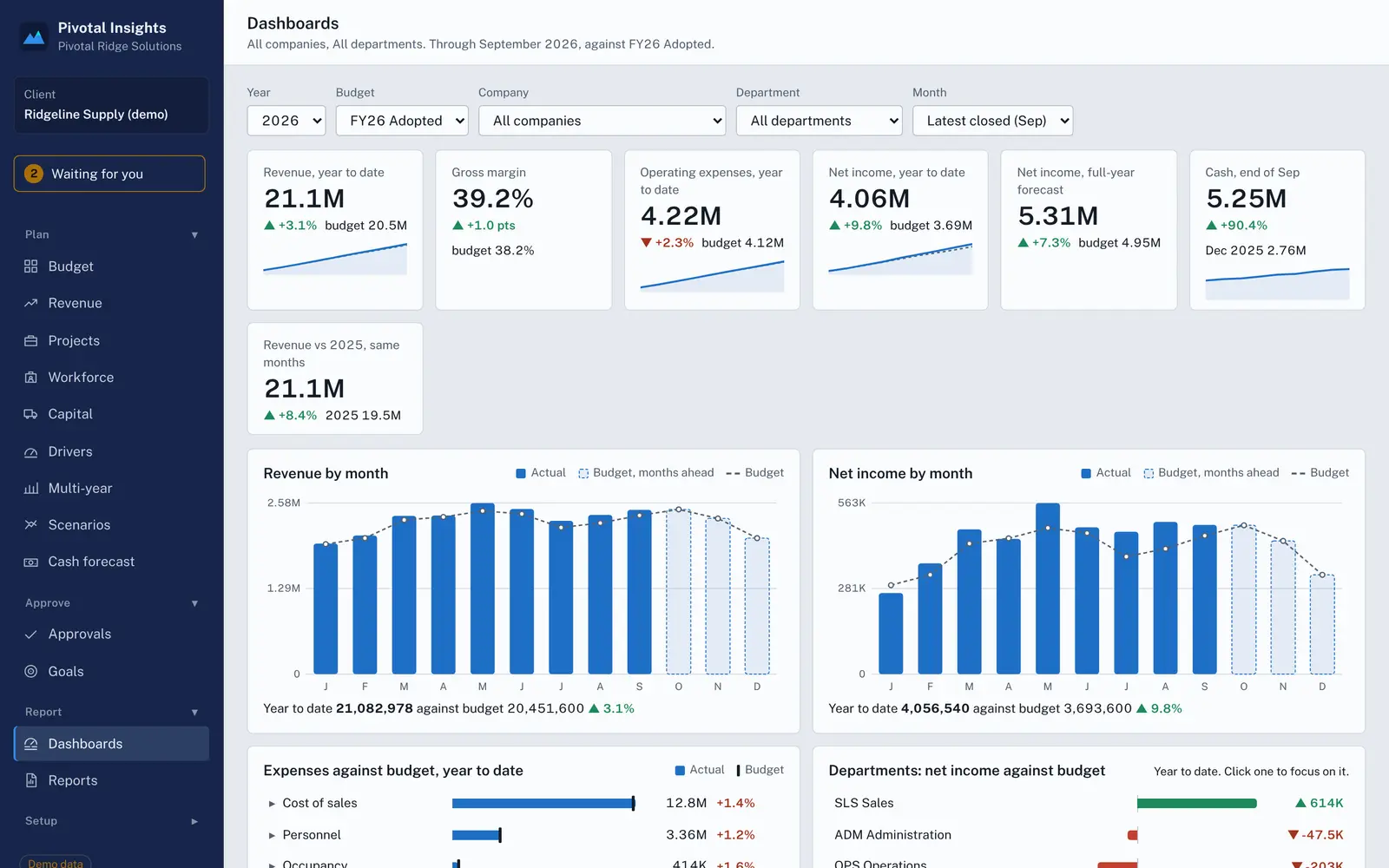
  • Dashboards with drill-down by month, department and category
  • A list of what looks unusual this month, like a charge billed twice or a recurring bill that didn't arrive
  • Income statement, balance sheet and cash flow, by department and by company, with intercompany eliminated
  • Your own report layouts, and month-end packages to Excel or PDF
Dashboards: revenue, margin, expenses and net income against budget, with monthly charts and trend lines.
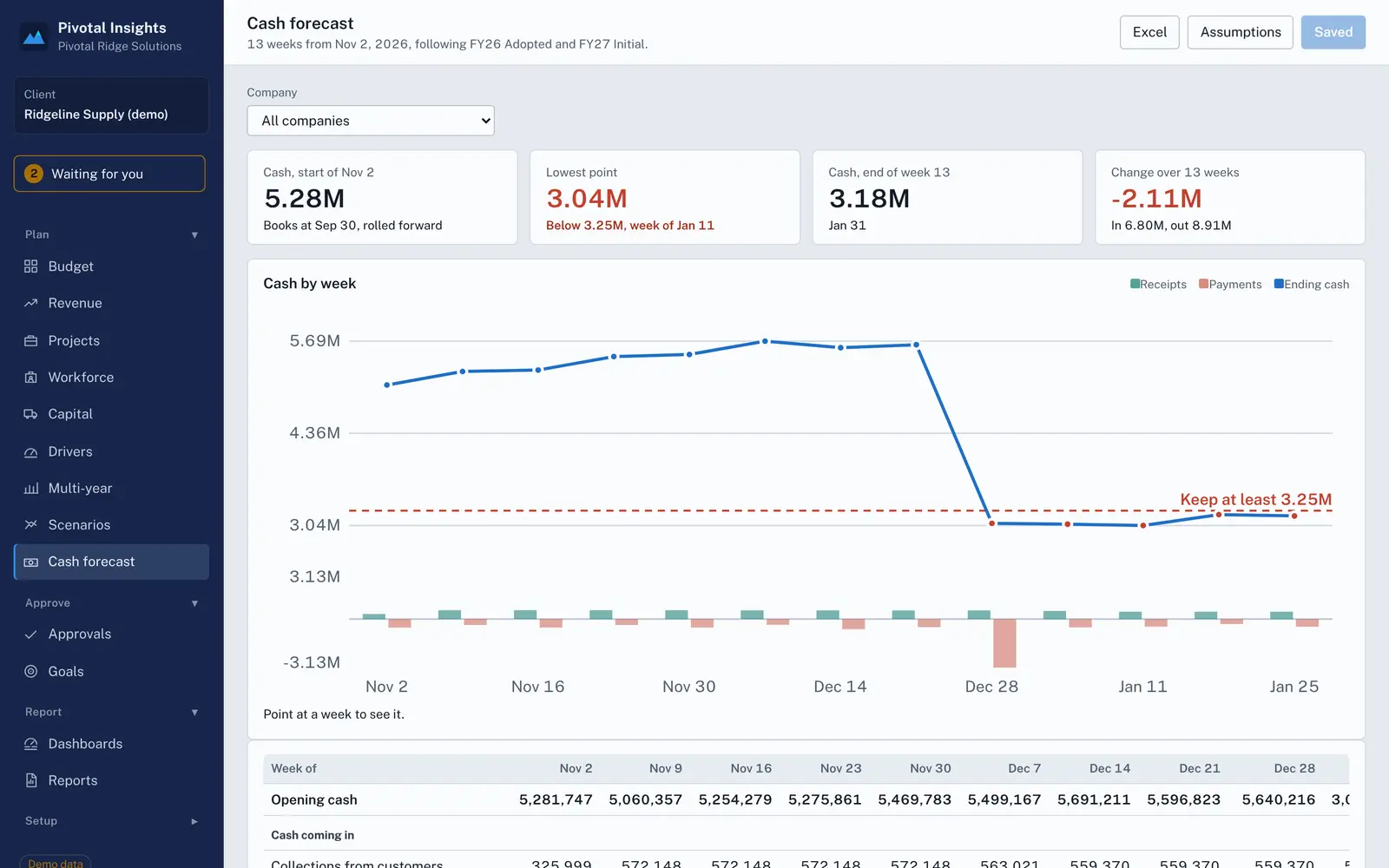
The 13-week cash forecast: ending cash by week against a minimum balance, with receipts and payments by week.

13-week cash forecast

Built from the books and the plan: customers pay on your receivable days, vendors on your payable days, payroll on pay dates. Add the payments the plan doesn't know about and see which weeks fall below your floor.
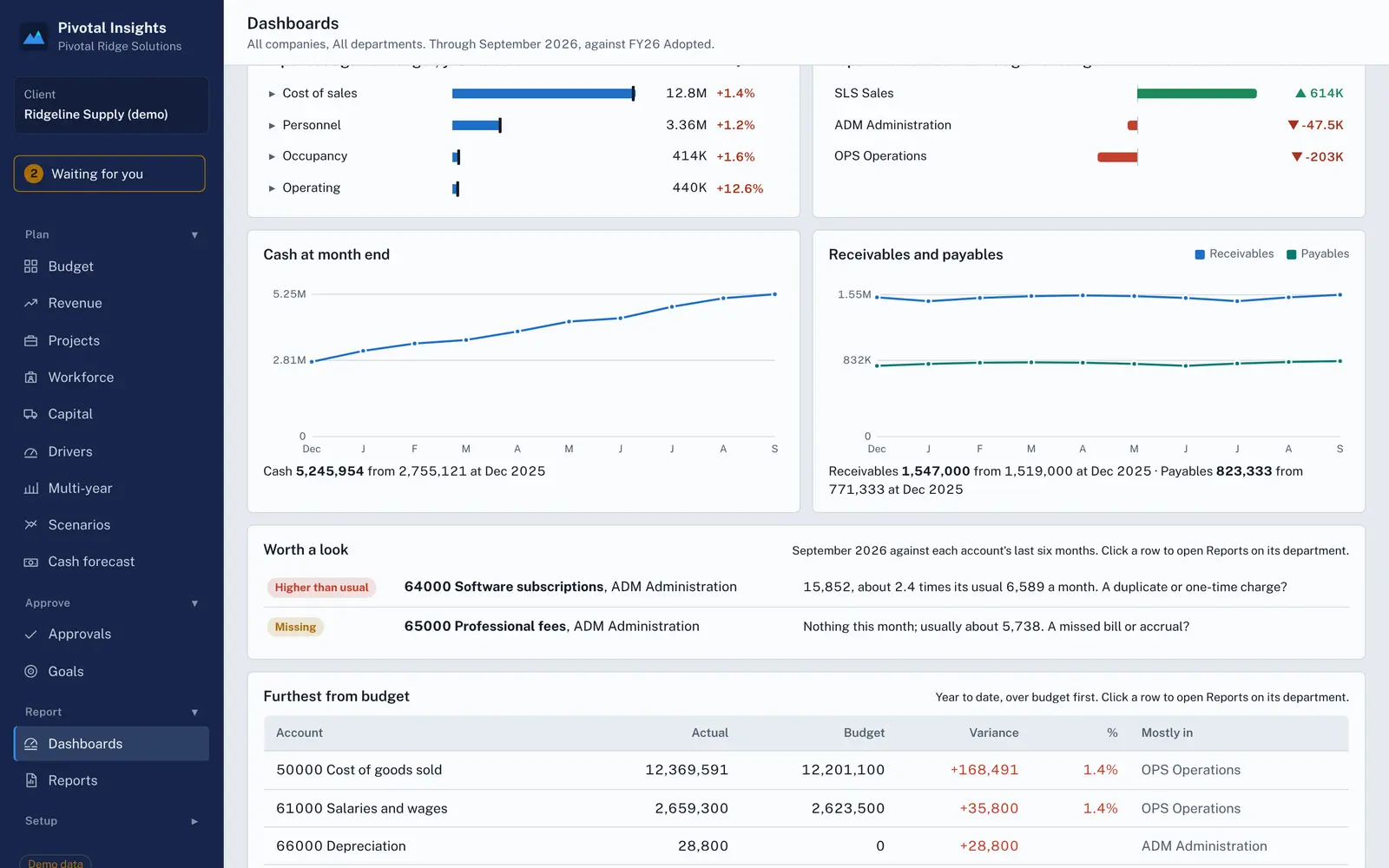
Cash and receivables charts above a list of unusual amounts this month, with the accounts furthest from budget below.

Worth a look

Every account is checked against its own recent months. A software bill at two and a half times its usual amount, or professional fees that didn't post, show up before anyone has to go looking.

AI that does the first pass.

AI drafts. People decide. Nothing is saved until someone reviews it, every request follows the user's own access, and a client can switch it off.

  • Draft a department budget from history and a sentence of guidance
  • Explain a variance in plain English, from the report's own figures
  • Build a roster from a pasted staff list
  • Start a capital request from a vendor quote
  • Rebuild your current P&L layout from a sample report
  • Answer questions about any report: what drove this month?

Connected to the ERP you already run.

Accounts, departments and actuals come over on a schedule you choose. The adopted budget goes back to the ERP's budget. How much comes over depends on the system.

SystemHow it connectsBudget goes back
AcumaticaREST API. Also brings users, employees, fixed assets, vendors, customers, projects and statistical accountsTo a budget ledger
Dynamics 365 Business CentralMicrosoft app registration, API v2.0To a G/L budget
Dynamics GPA small agent next to your SQL Server; outbound connections onlyTo a GP budget ID
Dynamics NAVThe same agent next to your SQL Server. NAV 2013 to 2018, and Business Central on your own serverFile for NAV's G/L budget import
Oracle NetSuiteToken-based authentication, SuiteQLFile for NetSuite's budget import
QuickBooks OnlineSign in with IntuitFile for QuickBooks budgeting
Sage IntacctWeb ServicesFile for Intacct's budget import
Anything elseMonthly actuals from an Excel or CSV exportExcel

Running something else, such as SAP Business One, Sage 100 or Epicor? Tell us which system. We build new connectors based on what clients run, and the Excel import works in the meantime.

Built by consultants who have done this work.

Pivotal Insights comes from years of implementing ERP systems and helping finance teams through budgets and month-end close. We have also implemented a number of other FP&A products, and watched their prices climb year after year while the features stayed about the same.

We saw the same problems at client after client: the budget rebuilt in Excel every year, actuals pasted in by hand, and planning tools that were either priced for large enterprises or discontinued.

So we built the tool we wanted our clients to have.

  • Set up by people who know your ERPYour chart of accounts, departments and close process are configured by consultants, not a support queue.
  • Priced for small and mid-sized companiesOne price per company with unlimited users, so every manager can take part.
  • Your ERP stays the system of recordActuals come from it and the adopted budget goes back to it. Nothing is keyed twice.

One price per company. Every user included.

Per-seat pricing pushes managers back to emailing spreadsheets. Pivotal Insights is priced by company and modules, with unlimited users, and set up in weeks for a fixed fee by people who implement ERPs for a living.

  • Unlimited users, approvers and viewers
  • Fixed-fee setup, live in weeks
  • Monthly or annual billing
  • Add modules as you need them
Ask for pricing

See it with numbers that look like yours.

Pick a demo company close to your business: distribution, construction, life sciences, software, professional services, associations or credit unions. No sign-up.